
Plenty of small business customers are over 60, and many of them look at the website before they call or visit. Yet a lot of websites make that harder than it needs to be: text too small or too faint to read, buttons too small to tap, phone screens that won't zoom, or a phone number buried three menus deep.
These problems are easy to fix but hard to notice, especially on a site you see every day. So I built a tool to find them. It's called Site Usability Review, it's free, and today I'm releasing it as open source. It's my small step to make the web a bit better for older adults.
What it does
You give it a website address. It reads a handful of pages, checks for common problems, and builds a review page in your browser.
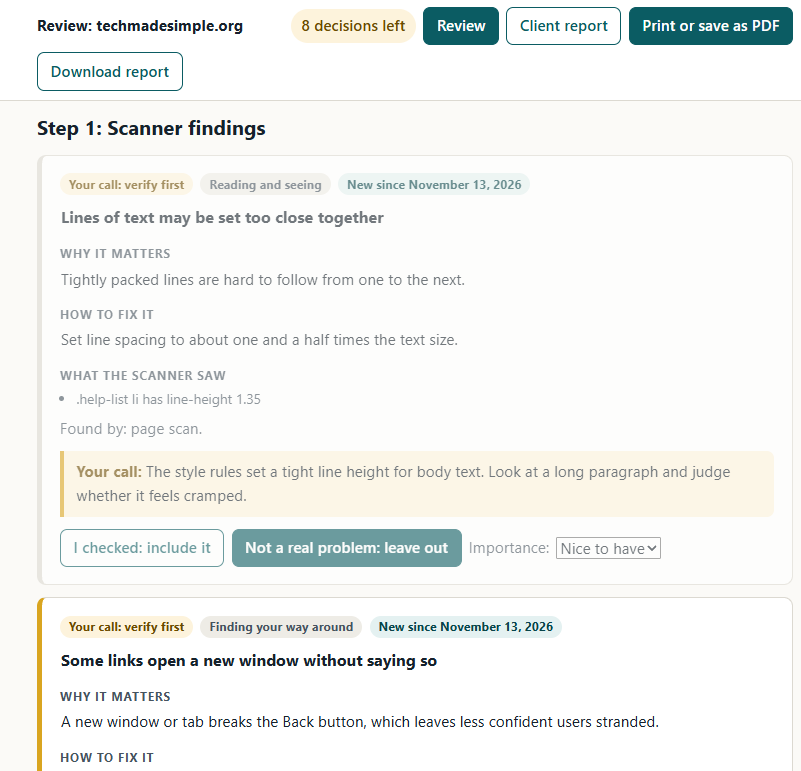
It checks for things like faint or small text, blocked zoom, pictures with no description, broken links, a phone number you can't tap to call, unlabelled form boxes, tiny buttons, and slow or insecure pages. Each finding explains, in plain English, why it matters and how to fix it.
A person still has the final say. Findings the scanner isn't sure about stay out of the report until you check them. Six quick hands-on checks, about 15 minutes in all, cover what no scanner can, like using the site with the keyboard only. When you're done, it builds a plain-English report you can print or email.
How to set it up
Fair warning: it takes a little technical setup. This isn't an app you tap to open. You run it by typing a short command on a Windows, Mac or Linux computer. If you've ever followed typed instructions to install a program, you can do this. Plan on 20 to 30 minutes the first time.
- Install Python, free from python.org/downloads. On Windows, tick Add python.exe to PATH.
- Download the tool from the releases page (Source code (zip)) and unzip it.
- Open a command window in that folder. Windows: type
powershellin the folder's address bar. Mac: open Terminal, typecdand a space, then drag the folder in. - Run a scan with your own website address (on a Mac, use
python3):
Then open review.html in the new out folder.python checkup.py https://yourwebsite.com --no-lighthouse
py instead of python.
For the full set of checks, including text contrast, tap size, speed and screenshots with each problem outlined, get a free Google PageSpeed Insights API key (a kind of password that lets the tool use Google's test). The setup steps are in the project's instructions on GitHub.
Rather not install anything?
The free online checkers Google PageSpeed Insights and WAVE are a good start. Or send this page to the techy person in your family.
Common questions
Is it really free?
Yes. It's under the MIT open-source license, so you can use it and change it, even for paid client work.
Do I need to know how to program?
No. You install Python and type one command.
Is my information sent anywhere?
It runs on your own computer. It contacts only the website you're checking and, for some tests, Google. Nothing is sent to me.
Will it tell me if my site meets accessibility law?
No. It's a practical usability review of a handful of pages, not a legal check. It can't tell you a site "meets accessibility law."
Sources
Site Usability Review on GitHub (instructions, limits and MIT license), Python downloads, Google PageSpeed Insights, and WAVE from WebAIM.